- The problem: Patient support cases are long-lived. They pause, resume, change owners, and repeat steps, so many generic case tools cannot hold the workflow.
- What we evaluated: case management platforms for a healthcare patient support program, assessed against Azure deployment, HIPAA-related controls, program-level separation, and ongoing change without core rewrites.
- Three ways to build it: configure a workflow platform, assemble from low-code tools, or build a custom application. The difference is where workflow state, rules, and operational control live.
- Shortlist: Flowable, Camunda, and Django Viewflow. Most others dropped out for a weak workflow model, cloud-only deployment, heavy HIPAA-related custom work, or too much platform burden on the team.
- Best fit: Flowable, which covers process flow, case behavior, and decision logic in one runtime. Its open-source edition proved too limited here.
- Closest alternative: Camunda, stronger for orchestration than case-led workflow.
- Framework option: Django Viewflow, more flexibility in exchange for more developer ownership.
- Final step: validate with a proof of concept that keeps case state, task state, history, and access control inside one platform runtime.
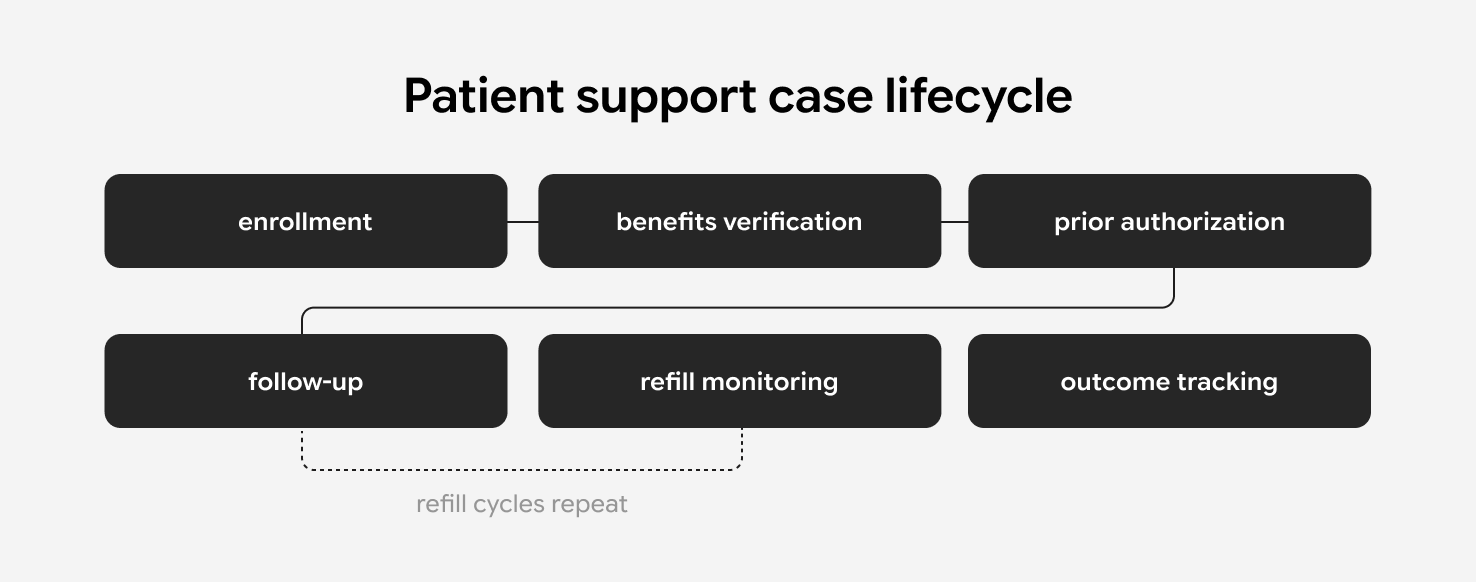
Patient support programs (PSPs) run on long-lived cases that move through enrollment, benefits verification, prior authorization, follow-up, refill monitoring, and outcome tracking. These programs sit inside a pharma hub and patient access support market valued near $3.5 billion in 2025 and projected to approach $10 billion by 2035.
A case may pause, resume, repeat steps, or change owner before it closes. That rules out many generic case management tools from the start.
A case management platform is a system that runs a case workflow and keeps case state, task state, history, and access control inside one runtime.
We ran into this exact problem in our own healthcare data engineering work at MEV, building a patient support program on Azure under HIPAA-related controls. We evaluated the available platforms against those requirements. Below is what we required and how the main options held up, so you can narrow the direction faster.
What Does a Patient Support Workflow Platform Need to Do?
It has to run long-lived cases end to end: preserve case state, vary workflows and data by program, keep rules inside the workflow, and give teams prioritized task lists with open-case visibility.
In this case, the system had to manage patients from onboarding through follow-up, across refill cycles, to discharge with a clinical outcome. It also had to support per-program customization for activities, collected data, validation events, follow-up actions, next steps, and task execution.
That narrowed the platform requirements to seven points:
- preserve case state across pauses, re-entry, ownership changes, and repeated cycles
- support different workflows by program
- support program-specific forms and fields
- keep rules and validations inside the workflow
- give teams visibility into open cases and assignments
- provide task work lists for operational teams, with tasks sorted by priority
- separate cases and user access by program, care teams, and locations
Program segregation mattered at both the workflow and access level. The evaluation also assumed that the same patient might need to exist in more than one program when that separation required it.
Technical constraints narrowed the field further. In this evaluation, Azure deployment was a hard constraint, so cloud-only products dropped out. The platform also had to support HIPAA-related controls, workflow-driven inbound and outbound integrations, and multi-program operation on shared infrastructure. It had to absorb ongoing change to workflows, rules, data models, integrations, and task-routing logic without repeated core-code rewrites.
HIPAA added a legal prerequisite on top of technical controls: the Business Associate Agreement (BAA). Any vendor that stores or processes protected health information (PHI) on your behalf has to sign one. Cloud workflow vendors often limit BAAs to higher-priced tiers or decline them on lower plans, which adds cost or rules the product out.
A self-hosted engine changed that calculation. Running the workflow inside a dedicated Azure subscription keeps PHI within a boundary already covered by the customer’s Microsoft BAA, so the workflow vendor never becomes a business associate for that data. That removed a procurement and compliance dependency before the build starts.
These filters removed many options before product comparison started. The platform had to do three things in one system: execute program-specific workflows, keep program-level separation, and give operational teams a usable task queue for day-to-day work.
What are the Three Ways to Build a Patient Support Workflow System?
The evaluation reduced the implementation choices to three paths: configure a workflow platform, assemble the system from low-code tools, or build it as an application. The difference between them is where workflow state, rules, and operational control live.
Configured platforms fail at the workflow boundary. They work while the process fits the platform model. Once a program needs its own transitions, validations, timers, and event-driven steps, that fit breaks and workflow logic leaks into custom code or side systems.
Low-code stacks fail at state ownership. You can assemble forms, automations, and storage quickly, but no single system executes the workflow. It runs across separate triggers and jobs, so the audit trail and change control get harder to manage.
Custom applications fail at the platform layer. The team owns the runtime behavior behind the screens and APIs: workflow versioning, retries, permission boundaries, audit history, and handling cases already in flight when the workflow changes. Django Viewflow stayed relevant because it keeps workflow logic inside Django and already includes workflows and permissions, but that path still shifts more engineering and operating burden onto the team.
This is what narrowed the shortlist. The viable options were the ones that could keep workflow execution inside one system without forcing the team into fragmented automation or a full custom workflow platform build.
When workflow state spreads across scripts and side trackers, the cost shows up in operations. A HIPAA audit has to reconstruct history from scattered logs when no single runtime holds it. A missed follow-up step can surface only after a patient has dropped out of the program, and a program change waits on an engineering release because the rules live in code. Runtime ownership keeps those failures away from the patient support team.
Which Platforms Made the Shortlist?
Three platforms made the shortlist: Flowable, Camunda, and Django Viewflow. We reached them by testing which products could support the three paths without breaking on the constraints. The candidates fell into three groups: platforms that already carry workflow and case execution, low-code products that assemble workflows from separate pieces, and frameworks that keep workflow inside application code.
The list included OpenMRS, Bahmni, Caseflow, SaasRock, Odoo, ERPNext, Monday, Appsmith, Retool, Flowable, Camunda, Conductor, Prefect, Restate, Django Viewflow, SpiffWorkflow, n8n, Node-RED, Django-River, and others.
Most of them dropped out for one of four reasons:
- no usable workflow model for this case
- cloud-only deployment
- too much custom work around healthcare workflow and HIPAA-related controls
- too much platform work pushed onto the team
A few examples show the pattern.
We ruled out Caseflow because it is cloud-based, could not run in the required Azure environment, and would need vendor collaboration to set up a custom workflow.
We reviewed Retool and Appsmith as low-code options. Both looked better for internal tools than for a workflow-driven case system. Retool also failed a hard constraint because it could not run in the required Azure environment. Its workflow model sat closer to backend process automation than to case progression with UI, state, and assignment.
We considered OpenMRS and Bahmni because they are healthcare-oriented, but neither fit the target shape well. OpenMRS lacked a clear workflow concept for this use case. Bahmni supported customization and scale, but its program model looked different from what this case needed, and the product looked hard to configure.
SaasRock stayed interesting only as a boilerplate for a custom system. It could run on Azure and had multi-tenancy, but healthcare workflows, healthcare-specific validation, and HIPAA-related controls would still need to be built or adapted.
Odoo and ERPNext stayed plausible longer than many others because they could run on Azure and had some workflow capability. They still looked weaker for this case. Odoo appeared limited in workflow automation and custom logic inside the workflow. ERPNext had workflows, but they were still beta and tied to particular services inside the app.
We also set aside the large enterprise platforms often proposed for this space: Salesforce Health Cloud, Veeva, and Pega. Each failed a core requirement before product comparison started. Salesforce Health Cloud runs as a managed cloud service, so it could not deploy into the required self-hosted Azure environment, and Veeva runs as cloud SaaS with a focus on pharma commercial and content use. Pega offers strong case management, but its licensing cost and operational footprint made it heavy for this scope, and much of its workflow value sits behind an enterprise stack the team would adopt wholesale.
That left three options with a clearer fit.
Flowable
Flowable is a workflow and case management platform that keeps process flow, case behavior, and decision logic in one runtime. It matched the target shape most closely, supporting BPMN (Business Process Model and Notation), CMMN (Case Management Model and Notation), and DMN (Decision Model and Notation).
We also found an API for third-party automation, an API endpoint to create a case, HTTP tasks for outbound calls, and Azure SSO integration. For program segregation, Flowable offers two options: separate tenants, or separate workspaces within one tenant.
The main open questions were operational:
- enterprise pricing
- Azure deployment model
- patching and upgrades
- scaling approach
- customization options
- users, roles, and tenant design
We also tested Flowable hands-on. We ran it locally through Docker, tried the cloud trial, and created a basic workflow with a task. The open-source edition proved too limited for the target case: it lacked Designer and pushed BPMN and CMMN authoring into XML.
Best fit: long-lived case workflows with mixed human and system steps, where process flow, case state, decisions, and integrations need to live in one platform.
Camunda
Camunda is a process orchestration platform and the closest alternative to Flowable here.
We found it very similar to Flowable, with support for BPMN and DMN, and CMMN in Camunda 7. It is a strong option for structured business process automation and orchestration, backed by mature developer tooling and broad enterprise adoption.
Camunda has since moved away from case modeling. It deprecated CMMN in Camunda 7 and dropped it from Camunda 8, which shifted fully to BPMN orchestration. Camunda 7 reached its final feature release in October 2025, and its Community Edition stopped receiving patches after that date. For a program built on case behavior, that path leads toward BPMN workarounds instead of native case models.
Fit kept it from the lead position. This case leaned toward one system that could hold case behavior, workflow progression, and decision logic together. We kept Camunda on the shortlist as the alternative rather than the preferred direction.
Best fit: orchestration-heavy workflows across services, where process control is the main concern.
Django Viewflow
Django Viewflow remained because it offers a different trade-off.
It’s a Django-based library that you extend into a full application, so it works more like a framework than a packaged workflow platform. It offers workflows, users with different permissions, active support, and the option to build the whole application on Django. It also has a Pro version with paid subscriptions.
That gives the team more control over the data model, UI, and integration logic. It also moves more responsibility onto the team. This path requires more developer involvement and coding, even though it offers more flexibility.
Best fit: teams that want workflow logic inside the application codebase and are willing to own more of the platform layer.
How Does a Patient Support Workflow Handle HL7/FHIR, EDI, and NCPDP Transactions?
A FHIR-based case management workflow triggers these transactions at state transitions and delegates the protocol handling to an integration layer. The engine calls out through service or HTTP tasks, and a FHIR server, interface engine, or clearinghouse translates the payload. Case state advances when the response returns.
Each step in a patient support case maps to a standard healthcare transaction:
- Enrollment and EHR data exchange run on HL7 and FHIR (Fast Healthcare Interoperability Resources), the standards for clinical data exchange.
- Eligibility and benefits verification run on EDI 270 and 271, the X12 request and response for coverage checks.
- Prior authorization runs on EDI 278, the X12 request and response for an authorization decision.
- Pharmacy routing and refills run on NCPDP SCRIPT, the standard for e-prescribing.
The platform delegates the protocol itself to the integration layer. Its job is to drive each transaction at the right point in the case and record the result in the runtime that holds case state and history.
What Should a Patient Support Workflow PoC prove?
A patient support workflow proof of concept (PoC) should prove that a single platform can run a full case end to end while holding state, tasks, history, and access control inside its own runtime. Shortlisting narrowed the viable products. The PoC confirms the runtime fit.
The PoC had to show that one platform could execute a full patient support workflow without pushing workflow control into scripts, middleware, or external tools. The runtime had to own case state, task state, timers, transitions, history, and access control.
Why run a proof of concept after shortlisting a case management platform?
Shortlisting narrows product risk, but it doesn’t confirm runtime fit. A PoC shows whether one platform can execute a full patient support workflow end to end while keeping case state, task state, history, and access control inside the same runtime, instead of leaking control into scripts, middleware, or external tools.
What does it mean for a platform to own workflow state?
It means the platform’s runtime holds case state, task state, owner, timers, transitions, and execution history directly, rather than reconstructing them from database flags, background jobs, logs, or external systems. When state lives in one runtime, audit history and traceability come as part of normal execution.
How Should You Choose a Case Management Platform for Patient Support?
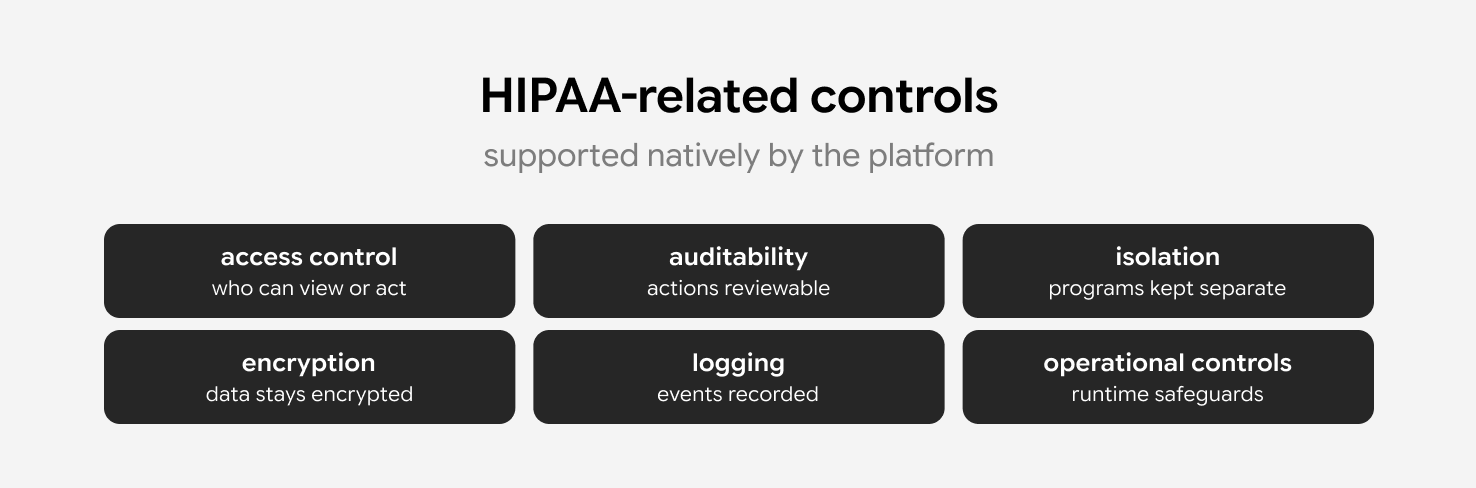
For patient support workflows, the target is a HIPAA-compliant workflow engine that runs inside your own Azure environment. Platform selection starts with runtime ownership.
The platform has to execute long-lived cases, hold state and history in one runtime, route tasks into the correct work lists, enforce access groups, and absorb program-level workflow change without core rewrites.
Most of these products can store cases, forms, and tasks. Few can execute the workflow itself while access control, integration behavior, and history stay inside one runtime.
That is why the shortlist converged on workflow engines and a workflow framework, the tools that keep execution in one runtime.
The last step is runtime validation. Build the PoC, run one full patient support workflow through it, and confirm that execution, isolation, history, and integration control stay inside the platform under the conditions your programs create.
We ran this platform evaluation for a healthcare patient support program, and we have built HIPAA-compliant data operations for PillowPH. If you’re weighing the same decision, we can screen platforms against your Azure and HIPAA constraints and implement the one that fits, from Flowable implementation to a custom build, then validate it in your own environment.
This article is for engineering and product leaders choosing a case management platform for a healthcare patient support program. It gives you the requirements we evaluated against and how the main platforms held up.
We wrote it because we ran this evaluation for a client’s healthcare patient support program at MEV. We needed a platform that could execute long-lived patient support cases, hold case state, keep programs separated, and deploy in Azure under HIPAA-related controls. Many products we expected to fit could not do all of that in one runtime.
To get here, we defined the operational and technical requirements first, reduced the build options to three paths, tested candidate products against the constraints, and validated the shortlist with a proof of concept. The findings on this page come from that work.