
There’s no need to guess — you’re definitely using systems of record: ERPs, financial systems, capacity planners, CRMs, HRIS, ITSM tools. For us at MEV, those systems hold the answers: who is available when, who owns which account, where a ticket is stuck, and who will be on the bench next month. The issue is the cost of access: every question turns into several screens, filters, and a context switch, which breaks the flow of a call.
We ran into this problem ourselves long before we started thinking about an AI agent. Inside MEV, we use an internal custom-built system called TeamPlanner for capacity planning and staffing visibility. TeamPlanner tracks people, projects, assignments, time off, departments, levels, locations, and related attributes. The data model can already answer most staffing questions. It has the data we need, and it does the job. But in practice, getting a simple answer still meant opening the app, setting filters, and pulling the pieces together by hand.
With AI becoming part of everyday work, those extra steps stood out as friction points. We wanted a simpler way to get answers from the system without making people dig for them every time.
This case is about the first stage of the journey: the groundwork that made it possible to build an AI agent over TeamPlanner that is read-only, respects existing authentication and authorization, and treats TeamPlanner as the single source of truth instead of creating a parallel data store.
Initial Issue: data is there, access cost is too high
On the data side, TeamPlanner already answers questions like:
- “Who’s an engineer/analyst/manager on project X?”
- “What does the engineering bench look like in February and March?”
- “What’s the allocation summary for project X (2×senior engineers, 1×manager, …)?”
The model and API cover people, roles, levels, departments, projects, assignments, and time off.
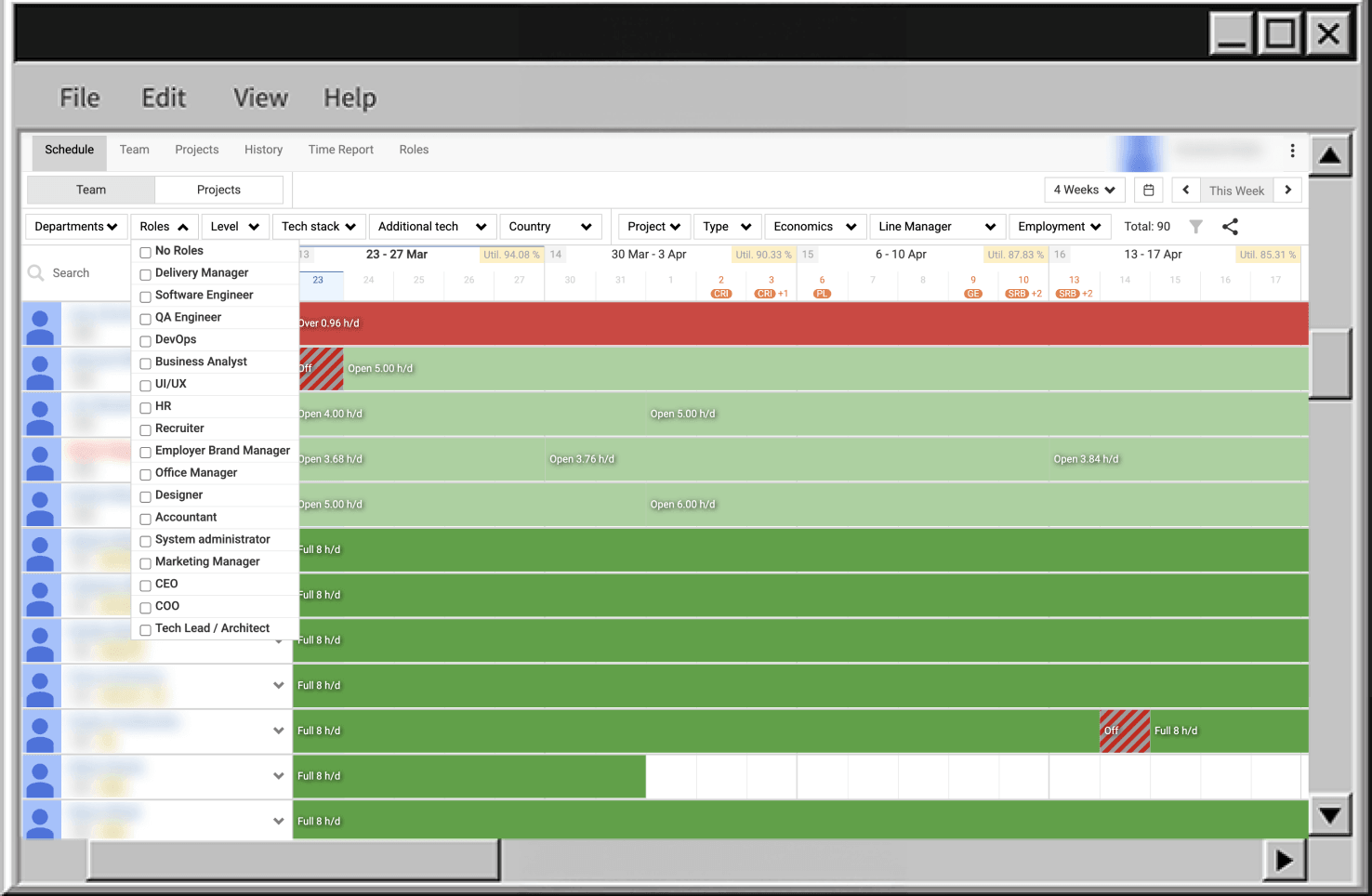
The problem is how you reach those answers. Each question usually means:
- opening TeamPlanner;
- finding the right project;
- switching tabs;
- adding filters;
- checking multiple screens;
- sometimes exporting data and doing the last steps mentally.
That effort is fine if you do it once in the morning. It fails in the middle of a staffing call where you have 30–60 seconds before the discussion moves on.
Business requirement: keep the same answers and the same source of truth, but expose them through a chat interface (Claude, ChatGPT, etc.) with latency that fits into a live conversation. If an “AI agent” also needs 5–10 minutes of manual steering per question, it turns into a worse UI, not an access layer.
V1 scope: narrow & read-only
For the first version we kept the scope deliberately small. The agent just acts as an access layer.
What V1 must do
V1 AI agent covers a narrow class of questions:
- who / what / when about people, projects, assignments, bench, and availability over a period;
- all answers derived only from TeamPlanner as the system of record;
- every call goes through the TeamPlanner API and respects per-user permissions enforced there.
If a user cannot see something in the UI, the agent must not be able to show it.
V1 guardrails (one set of constraints)
These guardrails apply everywhere in the design:
- Read-only – the agent can observe and analyze, but it cannot write, trigger side effects, or change system state. Later versions may expand this boundary and allow controlled agent-initiated changes where appropriate.
- API-only data access – all data goes through the TeamPlanner API; no direct DB access, no raw SQL.
- No extra infra in the proxy – no cache, no ETL, no background jobs, no queues inside the MCP server.
- No embedded model calls – the MCP server never calls LLM providers; models live in clients.
- Limited surfaces in V1 – direct MCP-capable clients only; Slack and other chat surfaces are handled separately.
V1 lowers access cost to existing data without extending authority or surface area. Later sections refer back to these guardrails instead of repeating them.
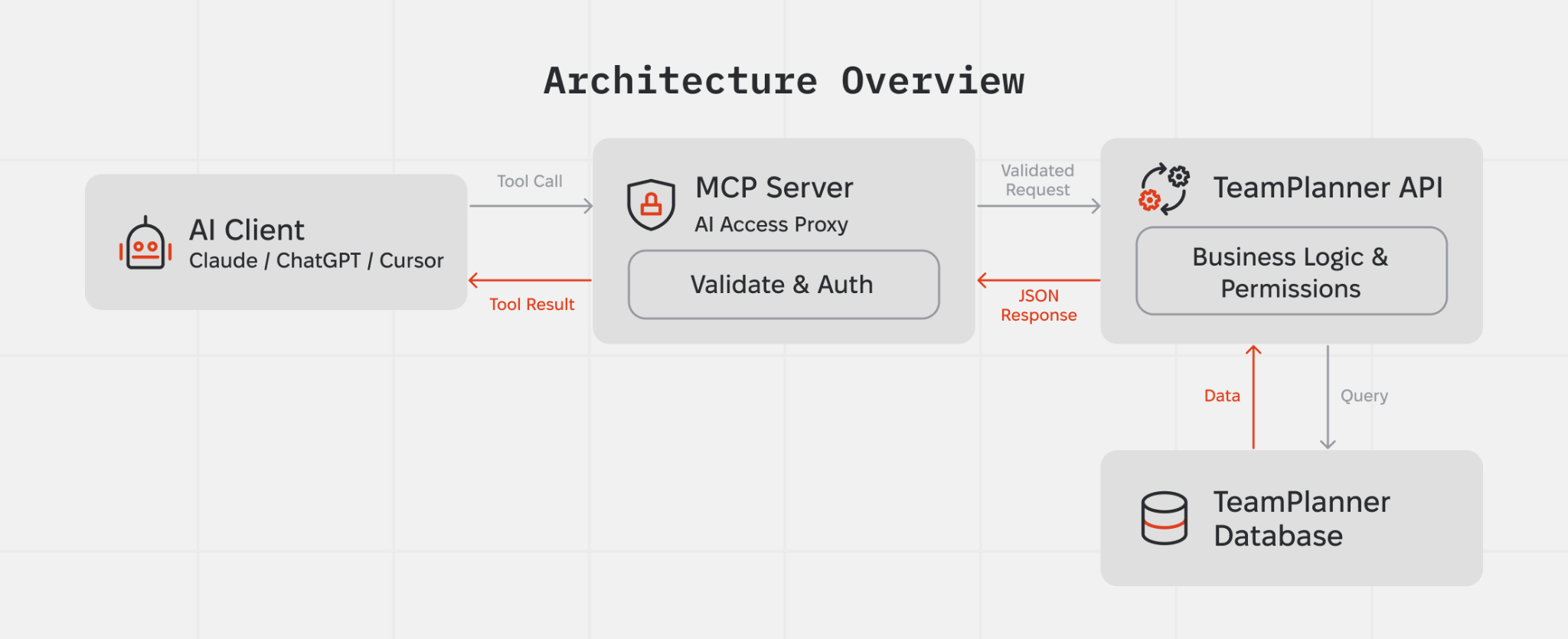
Architecture in one picture
At runtime the AI access layer is a small proxy that forwards a fixed set of tool calls to the existing TeamPlanner API. It does not own business logic or data; it authenticates the user, calls the right API method, and passes responses back to the model, under the V1 guardrails.
Conceptually, there are four components:
- A tool host that exposes a fixed list of operations (the MCP server).
- The TeamPlanner API, which holds business logic and permission checks.
- TeamPlanner’s database, which only the API talks to.
- AI clients (Claude, ChatGPT, Cursor) that decide which tools to call and how to combine the results.
The proxy validates tool arguments, attaches the current user’s token, forwards requests to the TeamPlanner API, and returns JSON results. There is no separate data model or alternative “truth” at this layer.
Authorization model: keep existing permissions
Authorization stays split across two layers:
- the MCP server manages its own session and bearer token;
- the TeamPlanner API remains the source of truth for data access and per-user permissions.
At the edge, the MCP server runs the OAuth 2.1 with PKCE flow. Both email/password and Google sign-in still go through TeamPlanner’s /v1/auth/* endpoints. The MCP server never talks to the database directly. During authentication, it stores the issued MCP bearer token and refresh token, and uses the bearer token on subsequent /mcp requests.
When the MCP bearer token expires, the MCP server rejects requests to /mcp with 401 Unauthorized. It does not refresh the token during tool execution. Instead, the OAuth client must call POST /oauth/token with grant_type=refresh_token, using the refresh token issued during the initial authentication flow. After that, tool requests continue with the new bearer token.
Inside TeamPlanner, every tool call still arrives as a regular API request with the upstream bearer token captured during authentication. The API validates that token and applies the same per-user permission checks it already uses for the UI and other API consumers. The MCP layer has no elevated access: if a user cannot see something in TeamPlanner directly, they cannot get it through the agent either.
Inside the MCP server, the current auth context is kept in memory via AsyncLocalStorage and made available to tool handlers, so tokens do not need to be passed explicitly between components.
As a result, the AI access layer only reads data a given user is already allowed to see, and it does so through the same authorization checks that already protect TeamPlanner.
Note: Refresh rotates only the MCP bearer token stored in TokenStore. It reuses the same upstream accessToken captured at authentication time, so expiry of that upstream token, for example Google, may still affect downstream API calls.
What the agent can actually answer
At the tool layer, the agent knows a small, fixed set of operations. Each operation maps to one or more TeamPlanner API calls. For example, it can:
- list users, optionally restricted to line managers (isLineManager flag);
- list profiles with roles, levels and departments;
- list projects with filters on status, department, and date ranges;
- fetch a specific project with its user history;
- ..and so on
From these building blocks the agent can answer:
- “Who is DM/BA/QA on project X?”
- “What does the QA bench look like for February and March?”
- “What unassigned capacity do we have by week for the next month?”
All of these combine the same tool set. There are no hidden operations with broader reach than the existing API.
How a question becomes an answer
Take the question: “Who’s on bench in March?”
The path from this question to an answer stays synchronous and linear:
- The user asks the question in Claude / ChatGPT / Cursor.
- The AI client already knows the available tools and their schemas from the MCP connection.
- The model decides it needs:
- the list of people with roles, levels and departments (get_profiles);
- the list of assignments in the March date range (get_all_assignments).
- It calls the corresponding tools. The proxy:
- validates the arguments;
- attaches the current user’s token;
- calls the relevant TeamPlanner API endpoints;
- returns raw JSON.
- The model joins profiles with assignments and excludes TimeOff projects to derive remaining hours per person, then (optionally) filters by role.
- The model returns a short answer: a list of people with available capacity.
There is no ETL pipeline or background jobs. Every answer comes from current TeamPlanner data through a single request/response loop, within the V1 guardrails.
Today, bench computation lives on the model side. That is acceptable for a V1 experiment, but behaviour depends on prompts and model versions. A more robust design moves bench into a deterministic API endpoint (for example, /v1/capacity/bench) and exposes it as a dedicated tool. In that setup, the agent calls a single endpoint with a date range and filters and no longer re-implements bench logic in prompts.
Early issues and what we changed
The first iteration exposed several structural problems.
Raw SQL access
The initial design exposed a generic “database” resource that let the model execute SQL directly against the TeamPlanner database. That turned every text field into a potential prompt-injection vector and effectively gave the agent database-level powers.
Prompt-to-SQL attacks against LLM-integrated applications have already been demonstrated in the context of frameworks like LangChain: unsanitised prompts can be steered into malicious SQL against the backing database. Security researchers are starting to treat this as a variant of classic injection risk, with the model as a code generator and the database as a critical sink.
We removed SQL access. The agent now calls only typed tools that map 1:1 to permission-checked API endpoints, in line with the V1 guardrails.
Guessing filter values
The model tried to “help” by guessing filter values, for example using "QA" where the database used "QA/QC/Tester". API calls were syntactically valid but returned empty lists, which looked like “no data” for the user.
We added reference tools (get_roles, get_levels, get_departments) and tightened the instructions: always fetch reference data first and never invent filter values. Filters now use values that actually exist in TeamPlanner.
Context-window overflow from oversized tool responses
Early on, large tool responses caused context window overflows. This happened when the agent retrieved broad datasets through heavy tools such as get_users and get_all_assignments. Once the limit was exceeded, the model lost prior context, restarted retrieval, or produced unstable answers.
At the moment, the MCP returns tool results as pretty-printed JSON (JSON.stringify(result, null, 2)), which increases payload size and makes overflows more likely.
Mitigation was added on the MCP side to control response size without changing the backend in the first iteration. This includes response transformation and selective shaping of tool outputs before they reach the model.
The approach targets two areas:
- reduce payload size at the MCP layer by removing non-essential fields and restructuring responses for agent use;
- move toward smaller, purpose-built API responses instead of passing full general-purpose payloads.
Further work will focus on backend endpoint optimization so the agent receives compact, task-specific data instead of large aggregated responses.
Reusability: how this pattern applies to other products
What we have here is a pattern that can be reused anywhere a system of record already exists and exposes an HTTP API.
Reusable building blocks:
- AI-ready API layer – expose existing REST endpoints as a small, typed tool surface instead of rewriting core systems or adding a second backend;
- OAuth 2.1 with delegated tokens – AI clients never touch the database; they receive scoped tokens tied to real user identities;
- tool design + instructions as behaviour control – tools define what the agent can touch, instructions define how it should combine those tools;
- model-agnostic connector – any MCP-capable client (Claude, ChatGPT, Gemini, others) can use the same tool set without backend changes.
This fits internal products where data already lives in a system of record but UI navigation costs time: ITSM systems, HR and people data, finance and invoicing, delivery tracking, access governance. Typical triggers include recurring ad-hoc questions, managers needing answers during calls instead of after them, and platform teams wanting conversational access without cloning logic into a new service.
Across these cases the V1 guardrails stay the same:
- start with read-only;
- reuse strict per-user auth and existing RBAC;
- avoid raw database access and generic SQL;
- keep agent powers narrow and explicit.
You end up with a conversational access layer over the system of record, while the system of record remains the only source of truth and the only place where real authorization decisions happen.