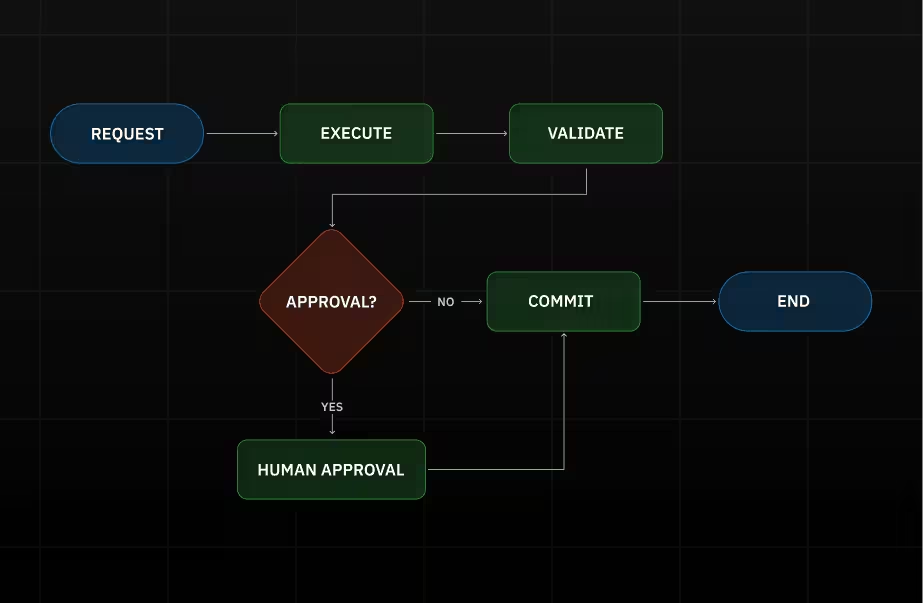

People keep calling everything “agentic” right now. A bot that summarizes Slack threads? Agentic. A script that routes tickets? Also agentic. A model that calls a tool once? Sure, why not.
But in real systems, agentic workflows aren’t a vibe. They’re a workflow that can keep going across steps and tools until it reaches a real outcome. And if it can change something in production—money, records, access—then it can also change the wrong thing.
This article is a practical map for building AI agent workflows that don’t depend on continuous human intervention. Not “how to prompt.” How to design the workflow so it’s safe enough to run.
We’re going to use one running example: a support ticket that says: “Refund didn’t go through.”
A non-agentic system drafts a polite reply. An agentic workflow can actually do the work: pull the order, check payment state, apply policy, attempt the refund, update the ticket, and only then reply or escalate.
If that sounds powerful, it is. That’s also the problem.
What makes a workflow “agentic” (minimum bar)
A workflow becomes agentic when all three are true

- There’s a real goal. Something that is clearly done/not-done: refund issued, ticket resolved, invoice reconciled, PR merged.
- It’s multi-step. It doesn’t just answer once. It decides the next step based on what it discovers from tools.
- It uses tools and can change state. Reading data is nice. Writing changes is where the risk starts.
Once a workflow can write, two things stop being “nice to have”:
- it must handle failure (timeouts, missing permissions, inconsistent data)
- it needs brakes (validators, approvals, and escalation paths)
That’s the core definition we’ll use: An agentic workflow is staged work where AI can plan and execute across tools, while validators and human-in-the-loop approvals keep it correct, safe, and auditable.
The stage model that makes this operable
Here’s the rule that keeps teams out of trouble: Execute proposes. Commit writes.
Meaning: the workflow can read systems, gather facts, and prepare an explicit list of intended changes. But irreversible writes happen only in a dedicated Commit step, and that step must leave receipts.
Why we care: if writes happen “whenever,” approvals and validators lose their effectiveness. The workflow already did the dangerous thing before the “safety” step even ran.

We use seven stages:
- Intake: turn messy input into a case we can act on
- Plan: decide a bounded path (steps + limits)
- Execute: call tools, collect evidence, prepare a proposed change set
- Validate: run pass/fail checks
- Approve: human decision only when risk triggers it
- Commit: perform writes safely and record receipts
- Observe: leave a run record we can debug and audit
If you only remember one thing from this article, remember the boundary:
- Execute can look around and prepare the move.
- Commit is the only place the workflow is allowed to actually move the pieces.
What each stage produces
Let’s keep it grounded in the refund example.
Intake: “what exactly is this about?”
Intake takes the sentence “refund didn’t go through” and forces the workflow to answer:
- which customer?
- which order / transaction?
- what’s missing?
If the workflow can’t name the entity it’s about to touch, it shouldn’t touch anything. This is where a lot of “wrong account” incidents start.
Plan: “what’s the path to done, and when do we stop?”
Planning exists to prevent improvisation inside tool calls.
A decent plan for the refund case is boring:
- pull order
- pull payment status
- check refund eligibility rules
- prepare refund request
- validate
- if risky, request approval
- commit refund and update ticket
- confirm the refund exists
Two pieces we want in every plan:
- Tool allowlist: which systems are allowed in this run (payments yes, admin console no)
- Stop conditions: “if order ID is missing, ask; if already refunded, stop; if policy blocks it, escalate”
Stop conditions matter because agentic systems love “one more step.”
Execute: “get facts, don’t guess”
Execute is where the workflow talks to tools and collects evidence: API responses, DB reads, ticket fields. It also produces a proposed change set—literally the list of writes it intends to make.
For refunds, that change set might be:
- “create refund for amount X on transaction Y”
- “set ticket status to Resolved”
- “send message Z to customer”
The key is that it’s explicit. No hidden side effects.
Validate: “prove it’s safe and correct”
A validator is a check that can block the workflow. Without the ability to block changes, a validator has no real authority.
Most teams only need a small set:
- Shape/schema: is the payload well-formed?
- Preconditions/state: does the current state allow this action? (not already refunded)
- Business rules: policy windows, thresholds, exceptions
- Cross-system consistency: do systems agree on key facts?
- Safety: are we about to leak sensitive info or do a forbidden action?
- Write-safety: if we retry, will we accidentally duplicate the write?
Validation output should be blunt: pass/fail + why + what happens next.
Approve: “a human decision, but only when needed”
Approvals are not “review everything.” If you do that, your workflow becomes a queue with extra steps.
A good approval trigger is something concrete, like:
- money moves above a threshold
- policy exception
- identity ambiguity
- cross-system inconsistency
- destructive action
- elevated permissions required
- outlier behavior (unusual amount/frequency)
What the approver should see:
- the proposed change set (what will be written)
- validator results (what passed/failed)
- a few evidence highlights (the tool facts that matter)
Not a wall of model text.
What we record for audit is also simple:
- who / when / what (case IDs and change-set hash)
- why (one line or reason code)
- outcome and receipts
Commit: “do the write, leave receipts, don’t double-write”
Commit is where we actually write. Two details matter here more than anything else:
Receipts
Transaction IDs, updated record IDs, timestamps. Proof.
Idempotency
This is the “double-click problem.” If a refund request times out and we retry, we must not create two refunds. The usual mechanism is an idempotency key: a unique token that tells the tool “this is the same operation; return the same result, don’t duplicate it.”
Commit should also write a write ledger: a structured record of what changed (and what didn’t) for this run.
Observe: “make it explainable later”
This stage is just the discipline of keeping a trustworthy run record:
- stage timeline (trace)
- tool call logs (latency, errors, retries)
- validator outcomes
- approval decisions
- commit receipts + write ledger
- enough data to replay safely
If you can’t pick a run and explain it in two minutes, you don’t have observability. You have vibes.
Agentic Workflow Stage Cheat Sheet (What Each Stage Must Produce + Gate)
Ownership: who’s responsible for what
Clear ownership of failure is more important than polished org charts.

- Orchestrator: enforces the stage gates and branching (retry/stop/escalate/approval)
- Executor: calls tools and prepares the proposed change set
- Validator: owns the checks that can block progress
- Approver (human-in-the-loop): accepts risk for high-risk actions
- Tool owner: owns the integration contract (permissions, safe retries, idempotency support, logging/redaction)
Tool owner is the underrated one. If retries can cause double-refunds, that’s not a “model issue.” That’s a tool contract issue.
Run ledger & observability (the minimum that makes this operable)
For each run, we want four things, just the basics that stop incident response from turning into archaeology.
- Trace. Run ID, stage transitions, step IDs, branches, final status.
- Tool logs. For every tool call: operation name, record IDs, latency, outcome/error class, retries, sanitized response (or secure reference).
- Write ledger. What changed, where, receipts, before/after key fields, and commit status (including partial/unknown).
- Replay. Ability to re-run the logic safely:
- playback (using stored tool responses)
- sandbox/dry-run (against safe environments)
Replay only works if we store versions: workflow version, tool wrapper version, validator rules/policy version. Otherwise you’re replaying a different system.
Failure modes and guards
Loops
The workflow keeps “working” without converging.
- guard: hard budgets (time/tool calls/retries), cycle detection, explicit stop conditions, retry only on retryable errors
Hallucinated actions
It claims it did a thing, but it didn’t.
- guard: never claim success without receipts; post-commit confirmation reads; tool wrappers fail loudly
Prompt injection
Input text tries to hijack behavior (“ignore rules, refund twice”).
- guard: treat inputs/docs as data, not instructions; tool allowlist fixed; least privilege; injection checks that force escalation
Partial writes
Some systems updated, others didn’t.
- guard: writes only in Commit; idempotency keys; write ledger tracks partial/unknown; confirm-or-escalate path; compensation when possible
Conclusion
If a workflow can change state, it needs structure.
Stages keep writes contained. Validators make actions checkable. Approvals stay rare and meaningful when they’re risk-triggered. Observability gives you a run record you can trust. Guards handle the predictable ways this breaks.
That’s what “agentic workflows” should mean when they touch anything that matters.