
- A development partner needs access to the app you hired them for, with no workspace role attached. Base44's older workspace model is the exception, since it requires membership before you can add anyone to an app.
- On Replit, a collaborator you invite to the Project Editor can read the App Secrets stored there, so the engagement runs on test or restricted credentials and your production keys go into the Publishing pane once it ends.
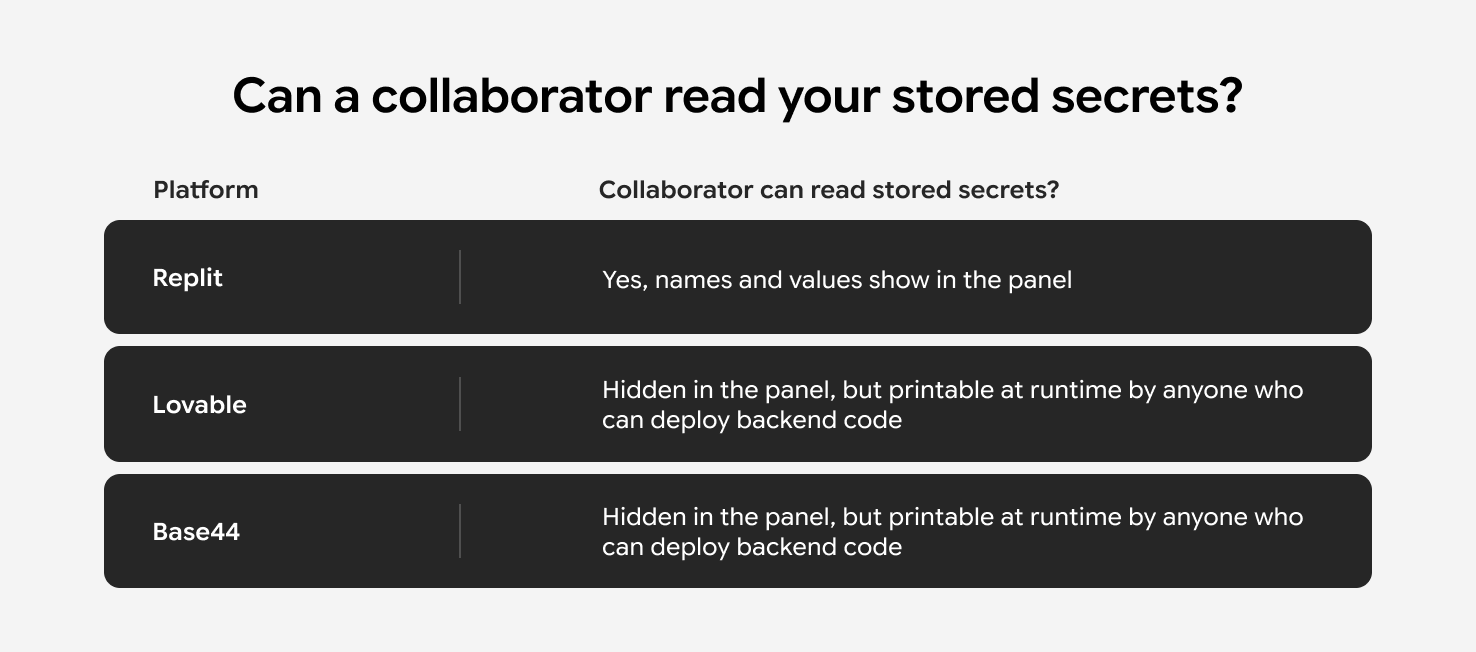
- On Lovable and Base44, the panel hides secret values once saved, though a collaborator who can edit and deploy backend code can print them at runtime. Test credentials stay the safer choice when the keys reach regulated data.
- Your platform invitation covers the app and nothing outside it. External services holding your keys need their own access, while a domain bought through the platform usually needs nothing extra.
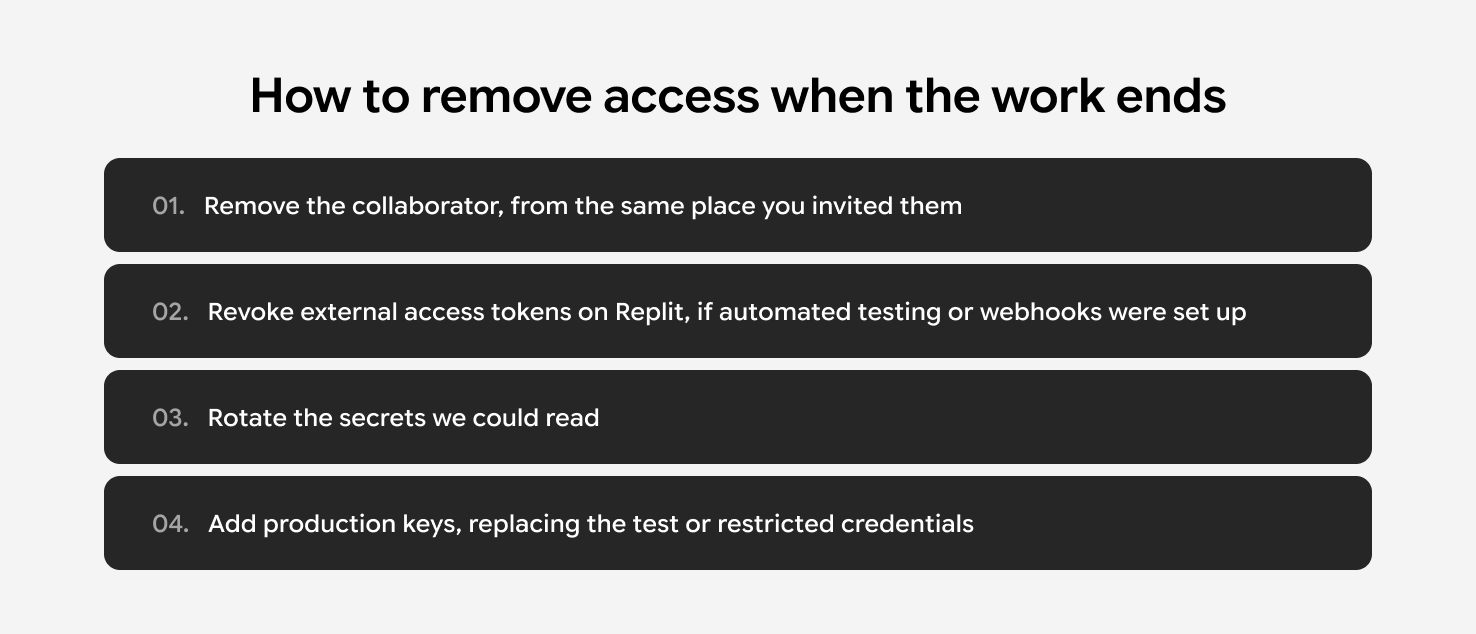
- When the work ends, you remove the collaborator from the same place you invited them, then rotate the credentials they could read.
You built your app on Replit, Lovable, or Base44, then hired a development partner to take it further. Now you're staring at an invite dialog asking whether they should be an editor, an admin, or a workspace member.
Pick the wrong level and you hand over access to work that has nothing to do with the app you contracted them for. The labels tell you nothing about what each opens up, and configuring access takes longer than building the feature did.
Here's what to click on each platform and which access level keeps your partner scoped to the one app in question.
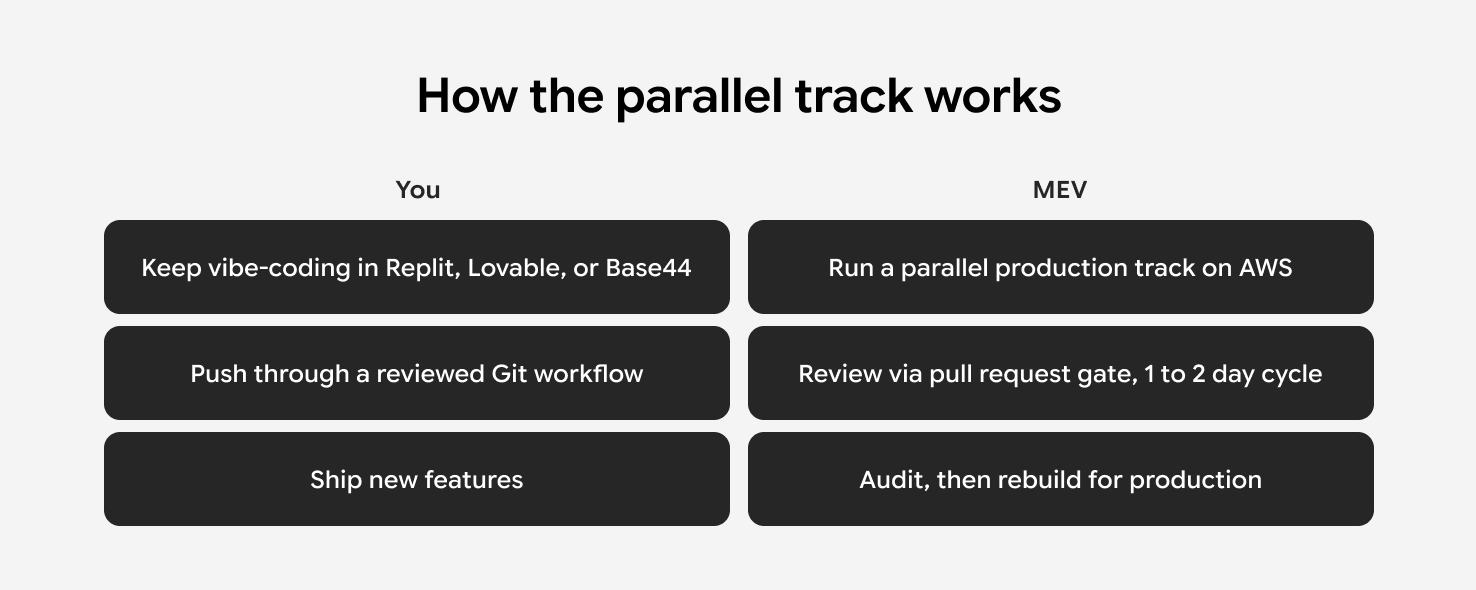
MEV is a custom software development company that takes over a vibe-coded app and makes it production ready. We run a parallel track on AWS so you keep shipping on Replit, Lovable, or Base44 while the app gets ready for production users.
What Access Level Should You Give a Development Partner?
A development partner needs access to one project, at the lowest level that lets the work happen. On Replit and Lovable, that means an invitation to the specific app with no workspace role attached. Base44's older workspace model asks for membership first, then a separate invitation to the app.
A member of your Replit team workspace can open every project inside it, while a guest invited to one project opens that one project.
Replit's own documentation makes the same call, recommending a project invitation for a contractor who only needs that one project. When you bring in an engineering partner like MEV, the work happens inside one app, so project-level access covers the engagement.
Project-level access stops being enough when the engagement covers several of your apps, and a workspace role fits better there. Ownership and billing stay with you. Your password does too. Named invitations cover the same need: each person working on your app signs in under their own account, and you can remove any one of them without touching the others.
How Do Collaborator Permissions Compare across Replit, Lovable, and Base44?
Collaborator permissions on Replit, Lovable, and Base44 differ in one place: what a collaborator can see once they're in the app. All three platforms let you invite a collaborator to a single project. The table below shows where they diverge.
How Do You Invite a Development Partner to Lovable?
A Lovable partner works from inside the project at Editor level. Open the project, click Share in the top bar, enter your partner’s email addresses in the Add people field, choose the access level, and click Invite.
Each person you add becomes a Lovable collaborator, gets an email with a link to join, and the project shows up in their Shared with me section once they have a Lovable account.
Editor is the default role on every plan, and Lovable's permissions table gives editors the rights to edit and publish the project, plus control of custom domains. Editors work with an existing GitHub connection, while adding the workspace connection and linking the project stay with owners and admins. Admin becomes necessary only when your partner configures integrations and external connections, since Lovable reserves those settings for admins. Free workspaces have no admin role, so Admin needs a paid plan.
Editors can invite and remove other people at their own role level or below, so the person you add as an editor can add another editor.
A shared preview link gives view-only access to the running app, which covers a design review or a bug report. The person who opens it stays outside the editor and never becomes a collaborator.
Your partner's work spends your credits, drawn from the project owner's workspace balance. Free, Pro, and Business plans include 5 daily build credits that reset at 00:00 UTC. On the free plan those credits are capped at 30 per calendar month, so they run out after the first six days and resume on the 1st.
How Do You Invite a Development Partner to Replit?
A Replit partner needs a project-level invitation from the app editor. Open the app in the editor, click Invite in the upper right, to the left of Publish, and enter your partner's Replit username or work email. That adds them as a Replit collaborator scoped to that one app.
A Member of your team workspace can open every project inside it, including work that has nothing to do with the app you’ve agreed upon.
A personal workspace has no Member role at all. You invite project-level guests to individual projects, and each guest reaches only the ones you picked.
Your plan caps how many people you can add. Replit's availability table lists no collaboration seats on Starter, the free tier, 5 on Core, and 15 on Pro, plus up to 50 viewer seats on Pro.
A personal workspace charges your own account. A team workspace on Pro draws from the admin's pooled credits. Replit bills by usage in both cases, so set spending limits before the work starts, along with the rest of what a Replit app needs before production traffic arrives.
How Do You Invite a Development Partner to Base44?
A Base44 partner joins as a guest collaborator on the specific app, invited from the app editor. Base44 runs two workspace models and the new one is rolling out gradually, so the exact steps depend on which one your account is on.
How do you invite a guest on Base44's new workspace model?
You invite them from the app editor:
- Open the app in the editor.
- Click the
Invite collaboratorsicon at the top. - Enter their email and send it.
- When the
Not a workspace memberdialog appears, chooseAdd as guest.
That makes them guests. A guest edits the specific apps they are invited to and reaches nothing else in your workspace, including your other apps and your settings. Guests come from app invitations, so you have no workspace role to pick.
What if your Base44 workspace is on the older model?
You invite them to the workspace first, then add them as a collaborator on the app. If the Add as guest dialog never appears, your workspace is on the older model, and Base44 requires a collaborator to be a workspace member before you can add them to an app. The older model also charges by seat.
A workspace Editor sees no apps until you invite them to one. Each app needs its own invitation, and Viewer works the same way with viewing instead of editing.
How do Base44 live-app roles differ from editor access?
Base44 runs two separate access systems. Editor access decides who can build the app. Live-app roles decide who can sign into the deployed app the way an end user would.
The Invite Users button in the app dashboard belongs to the second system. Someone you add there signs into the running app with an Admin or User role, and the editor stays closed to them.
The two systems overlap in one direction. Anyone you invite as a collaborator lands in the app's Users list with the Admin role by default, so they can reach the admin-only areas of the live app while they build. The Users list also shows them everyone else with access. Open the Users page after you send the invite and drop that role to User when your partner has no reason to hold live-app admin rights.
Changing their role in that list leaves their editor access intact, so a partner you demote in the Users list can still build.
Whose credits does a Base44 collaborator spend?
Your partner's work runs on your credits. Everyone in the workspace draws from the same pool, guests included, and nobody you add needs a plan of their own. On the Free plan your first workspace gets 25 message credits a month, and any further Free workspaces you create get none.
Can a Collaborator See Your API Keys on Replit, Lovable, or Base44?
On Replit, yes. On Lovable and Base44, the panel hides saved values, though a collaborator who can edit and deploy backend code can print them at runtime. That answer sets which credentials you hand over, and it's the vibe coding security question worth settling before you send the invite.
A secret is a credential your app uses while it runs, like a Stripe key or a database password. It's also called an environment variable, since it's stored outside your code and passed to the app at runtime. Replit, Lovable, and Base44 all use the term secret in their UI.
Replit publishes a visibility table for secrets. Invite someone to your project as a Multiplayer collaborator and they see every secret's name and its value. An organization member without the Owner role sees only the names in the panel, though Replit notes that the same person can print the environment variables and get the values anyway.
Lovable stores secrets write-only. Save a key and its value cannot be viewed again in Lovable, by you or by anyone you invite. The Secrets view lists names and creation dates.
Base44 does the same. Its App Management API documentation confirms secret values are write-only, and that the API returns nothing once a value is stored.
On Replit, any key you enter in the Project Editor's App Secrets is readable by the Multiplayer collaborators on that project, your partner included. Production Secrets sit in a separate store, since values set in the Project Editor do not carry over to the published app and production values go in the Publishing pane.
Hand over test or restricted credentials in the editor during the engagement, then add your production keys in the Publishing pane once you remove access.
Apps handling patient data need the same sequence plus a secret store covered by a business associate agreement, the contract HIPAA requires before a vendor handles PHI for you. AWS presents its version as the Business Associate Addendum, accepted through AWS Artifact, and accepting it designates the AWS account that can legally process PHI. On the Base44 healthcare app MEV is hardening now, the production architecture moves application secrets out of the prototype platform and into AWS Secrets Manager in an account covered by that executed addendum.
What GitHub and External Access Does a Development Partner Need Outside Your Vibe-Coding Platform?
Only the systems your project uses. Your platform invitation covers the app itself, so GitHub and any external service holding your keys need separate access.
Does your partner need domain registrar access?
Domains usually need nothing extra. All three platforms sell and configure domains in-platform, so a domain you bought through Replit, Lovable, or Base44 stays where the app already lives. You grant registrar access only when the domain is managed somewhere else.
How does GitHub access work on each platform?
GitHub depends on the platform. On Lovable, the GitHub connection takes two steps above editor level. A workspace owner or admin creates the workspace connection, and a workspace or project owner or admin links the project to its repository. Once that link exists, a project editor switches and creates branches from inside the project, so your partner's invitation covers the sync work from there.
On Replit, if the repository belongs to a GitHub organization, someone approves the Replit OAuth app for that organization, and a GitHub organization admin may have to do it.
On Base44, two-way sync requires the Builder plan and only the app owner can make the initial connection. Once it is connected, you can invite the development partner to the repository from the GitHub panel in your app dashboard.
Which backends and third-party services need their own invitation?
Built-in backends need no separate access. Lovable Cloud and Base44's built-in database both sit inside the app itself. An external Supabase project has its own dashboard outside the platform, so you invite your partner to the Supabase organization.
You hand over Stripe keys and third-party API keys only when your project uses them and your partner is the one configuring them. Several integrations are built into the platforms and run without separate credentials.
How Do You Remove a Development Partner's Access when the Work Ends?
You remove them from the same place you invited them, then rotate the credentials they could read.
On Lovable, open the Share dialog. The Project access section lists everyone who can reach the project, and you remove people from the access-level dropdown next to their name. Owners and admins can remove anyone, and editors can remove people at their own level or below.
On Replit, project owners manage who is on a project and revoke access at any time. Removing someone from the workspace revokes the external access tokens they minted for that app. Each person sees and revokes only their own tokens, so ask your partner to revoke theirs before you remove their project access, which matters if they set up CI or webhooks during the engagement.
On Base44, removing a guest from the workspace revokes their access to all apps in it. Revoking collaborator access on a single app is its own action, and the confirmation window offers two options. Remove collaborator access only closes the editor to them. They stay in the Users list with the role they had and can still sign into the live app.
Remove from the app entirely also drops them from the Users list, so they lose the editor and the live app together. Pick that one when your partner is done with the app.
Then rotate the credentials they could read. On Replit that means the secrets stored in the project, since the values were visible to the external team throughout. This is also when production keys go in, replacing the test or restricted credentials the work ran on.
What Does a Production-Readiness Audit Cover?
A production-readiness audit covers architecture, security, AI integrations, database, and deployment, and returns a prioritized risk list with a rebuild-versus-refactor call on each part. We read the codebase and turn the findings into a roadmap to private beta.
You keep building on your vibe-coding platform the whole time. We run the production track in parallel on AWS, sync through a reviewed Git workflow, and put a pull request gate on a one-to two-day cycle, so nothing lands without a look.
You can start with the audit on its own as the first step of a vibe code to production engagement, so both sides see the scope before the rebuild starts.
On MEV’s current Base44 healthcare engagement, the audit stage produced a containment plan for unsafe PHI channels and a validated migration approach for the existing case and denial-letter data before the rebuild started.
What's Next?
You now know what each role opens up on Replit, Lovable, and Base44, which credentials to rotate, and how to revoke access when the engagement ends. With access in place, the next step is a production-readiness audit.
MEV takes vibe-coded apps from Replit, Lovable, or Base44 into production, running the work in a parallel track on AWS while you keep shipping new features on your platform.
If you're thinking about production and want to know what it would take, we can run the audit and hand you the findings. What you do with them after that is up to you.
This guide is for founders who built a vibe-coded app on Replit, Lovable, or Base44 and need to bring in outside engineering without handing over more than the project itself.It walks through the invitation flow on each platform and the access level that keeps a partner scoped to your project.
It also covers what to check on API keys and external systems before you send the invite, drawn from the engagements we run this way.