
A physician built a healthcare denial-review app (ClinicalDenialPro) in Base44. It worked, cutting case prep from about 30 minutes to five, on work that outside reviewers can charge about $250 a case for.
Other advisors adopted it, and Anova weighed a wider rollout. But a low-code prototype now used across multiple users and two covered entities needed a production foundation.
MEV kept the physician's workflow and rebuilt everything underneath it on AWS, inside the client's own account.
What that took:
- Audit where PHI moves before changing any code
- Back up the data, then close the unsafe paths, including an email export that had become the only backup
- Move authorization out of the browser and into the backend
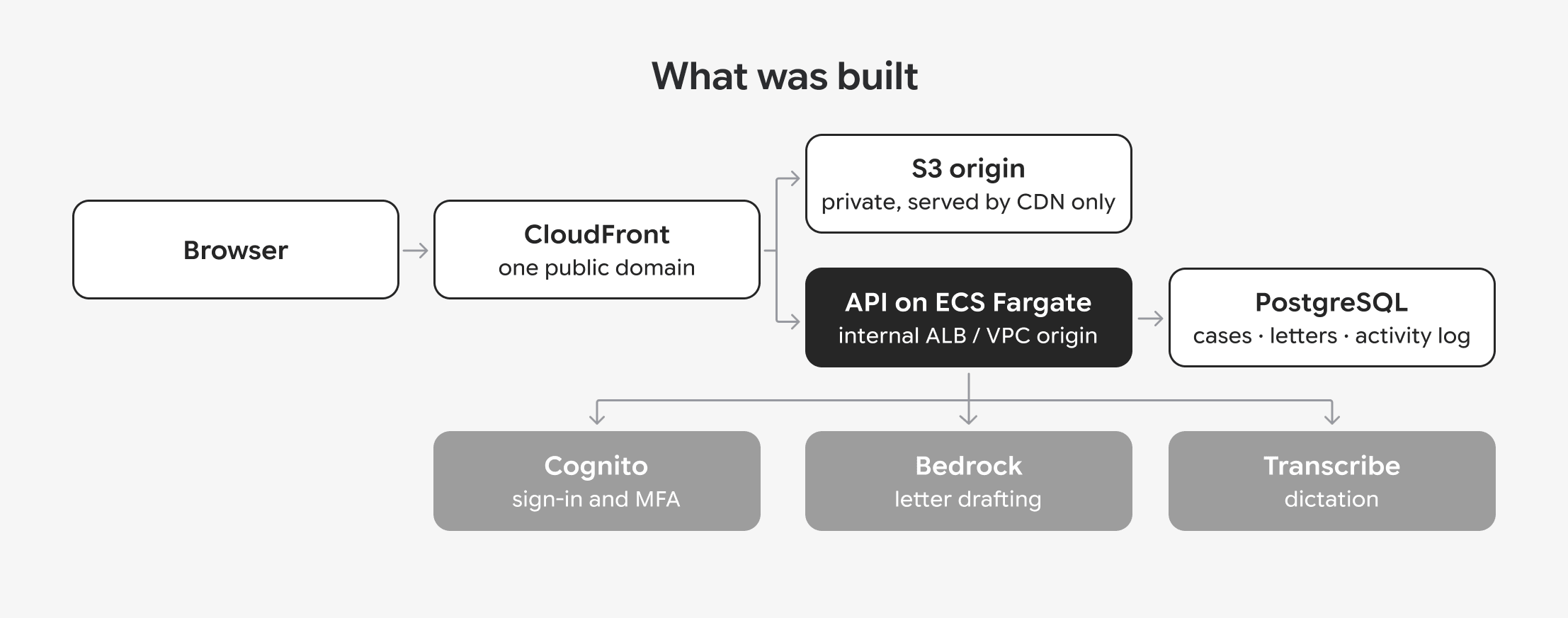
- Keep Claude drafting and dictation, but route them through Amazon Bedrock and Amazon Transcribe so PHI stays in controlled AWS services
- Migrate historical records with a dry-run-first process that reports problems before it writes anything
- Add the CI/CD and audit controls a team needs to operate it
The result: the migration and production cutover are complete, the trial run reconciled with zero record loss, and the physician's workflow is unchanged.
At some point a low-code healthcare app stops being one person's tool. As more people and sites rely on it, it needs to stand on production-grade foundations. The prototype that got you this far won't hold much longer, and starting over from scratch means losing the workflow your team already trusts. Here's what it can take to move a healthcare Base44 prototype to AWS, grounded in how MEV rebuilt one physician-built app: keeping what worked, rebuilding everything underneath.
What Changes from Prototype to Production
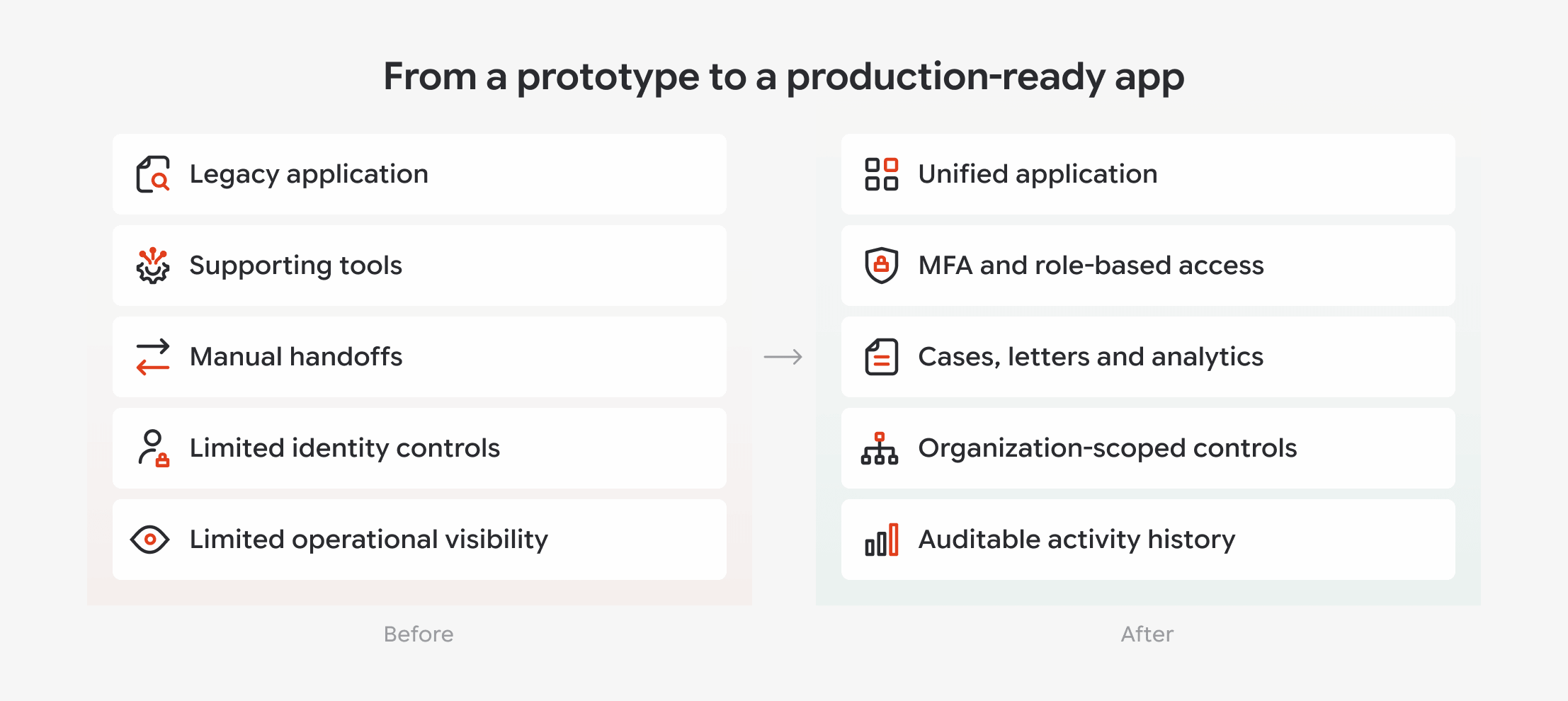
Moving to production changed how the app handles sign-in, access, backups, AI, and hosting. The table below compares the prototype and the production build, area by area.
Why Does a Working Healthcare Prototype Need to Change before Wider Use?
A prototype built for one user needs additional controls before several people and sites could depend on it.
MEV recently worked with Anova Medical Associates, a group that helps hospitals review insurance denials and prepare the appeals. One of their physicians had built himself a tool for that job, ClinicalDenialPro, drafting appeal letters and status justifications from clinical case notes.
He built it in Base44, a low-code platform, without an engineering team. It worked well enough that he reported cutting his prep on each case from about 30 minutes to five, using dictation and AI-assisted drafting, and it ran at his location without trouble.
Then other advisors started using it, and Anova began weighing a rollout across its hospital operations. A build that suited one physician was now holding that data for a growing group of them.
MEV is a custom software development company that has built healthcare systems since 2006 and hardens AI-generated prototypes into production healthcare applications. Before touching the architecture, we started by assessing what the prototype was built on. Its access model and data paths suited a single-user experiment and would not hold for an application several sites depend on.
What Should You Audit Before Scaling a Vibe-Coded Healthcare App?
Audit the running application to find where patient data is stored and which services and paths touch it, before you change any code.
MEV began the Anova project here, with a Phase 0 assessment of the live application before rebuilding anything. The assessment covered the app end to end:
- the production dataset and where patient data moved through it
- the access and authentication model
- service functions, exports, and open debug or import endpoints
- AI calls and browser speech processing
- backups and the hosting setup
- third-party dependencies
That work set a data baseline too. We counted case rows across distinct patients, and used that count as the reference the migration was later checked against.
PHI, or protected health information, is any health detail attached to an identifiable person, such as a name or medical record number tied to a clinical note. Once more than one person handles it, any weak path in the app turns into a place that data can escape.
How Do You Close Unsafe Data Paths Without Losing Data?
Back up the data and confirm the backup works before you disable any unsafe path. Some of those paths may be the only copy of the data you have.
This was the case at Anova. The path we were about to shut off was also the only usable backup the app had.
So the order of operations mattered more than any single fix. We worked the containment in sequence:
- Create a full backup.
- Verify the record counts and sample the data to confirm the backup is sound.
- Close the unsafe path.
- Confirm the old endpoints no longer respond.
Only after the backup checked out did we close that path and remove the functions behind it. The same pass tightened access across the app.
The wider lesson holds for any productionization job: do not remove an unsafe legacy mechanism until you know whether something the app depends on is running through it.
Should Authorization Live in the Frontend or the Backend?
In the backend. In a production healthcare app, the server decides what each user can see and change. The browser only displays what the server already allowed.
The Base44 prototype worked the other way. The frontend requested the data and filtered it for display, which put the decision about what each user could reach in the browser. That was fine for a single physician on one set of cases. With several advisors and two covered entities (the HIPAA term for the organizations legally responsible for the data), light frontend controls were no longer enough.
We moved that decision to the backend. Sign-in runs through Amazon Cognito, and multi-factor authentication is mandatory, enforced by the application itself.
The database stays private, with no path to it from the internet. Patient data is encrypted at rest with AWS KMS and in transit over TLS.
The same principle reached the clinical rosters. In the prototype, physician and advisor names lived in the application code and enums, so adding or removing a physician meant a code deployment.
We moved those rosters into database records tied to the right organization and site, where an administrator updates them without shipping code, and the backend checks the organization and site context whenever those values are used.
How Do You Isolate Two Covered Entities in One Deployment?
Enforce the organization boundary in one shared backend layer that every data query passes through, so no screen or endpoint can bypass it. This is multi-tenant isolation: two covered entities in one deployment.
ClinicalDenialPro runs two separate covered entities inside one deployment, and each entity's data stays walled off from the other. The app works out which entity a user belongs to from their authenticated identity, so the browser can't claim otherwise.
The weak way to do this is screen by screen, where one endpoint that forgets the check leaks across the wall. We put the scope in a single backend layer instead. Every query for patient data passes through it, so isolation is enforced in one place rather than re-added on every new route.
We also made the boundary testable. Every backend route has to declare its organization scope, and the build fails if one is added without it. A developer can't ship a route that skips the wall.
How Do You Keep AI and Dictation Without Exposing PHI?
Keep the features, and change where the patient data goes. Route the AI and speech processing through the authenticated application backend, so the browser no longer sends PHI directly to external AI or speech services.
Claude drafting and voice dictation were part of what made ClinicalDenialPro useful, so removing them was off the table. Both were also PHI paths. Dictated clinical narratives carry patient detail, and so does the case context that goes to the model. The engineering task was to keep both features and change where that data gets processed.
For dictation, the prototype used the browser's own speech recognition. We replaced that with Amazon Transcribe, AWS's speech-to-text service.
The physician dictates, the application sends the audio through a controlled AWS path, Transcribe returns the transcript, and the physician reviews it. The browser Web Speech API is gone from the production flow, and typed input still works if transcription fails.
For drafting, we kept Claude but changed how it is reached. The model is called through Amazon Bedrock, a managed AWS service for running foundation models, instead of browser code.
We preserved the existing prompts first and compared the output against the prototype before tuning anything, so a behavior change from the migration would not get mistaken for a prompt problem.
Where possible, the design strips patient identifiers before the model request and restores them only when the final document is rendered.
Dictation and AI drafting are pinned to approved US regions in the app's configuration, so every request runs in a region the client approved.
How Do You Migrate Historical Patient Data Safely?
Don't migrate in one shot. Do a dry run first that only reads the data and lists every record it can't move safely, with the reason for each, so the client can fix those before the apply run writes anything. Then compare the result against the original to confirm nothing was lost.
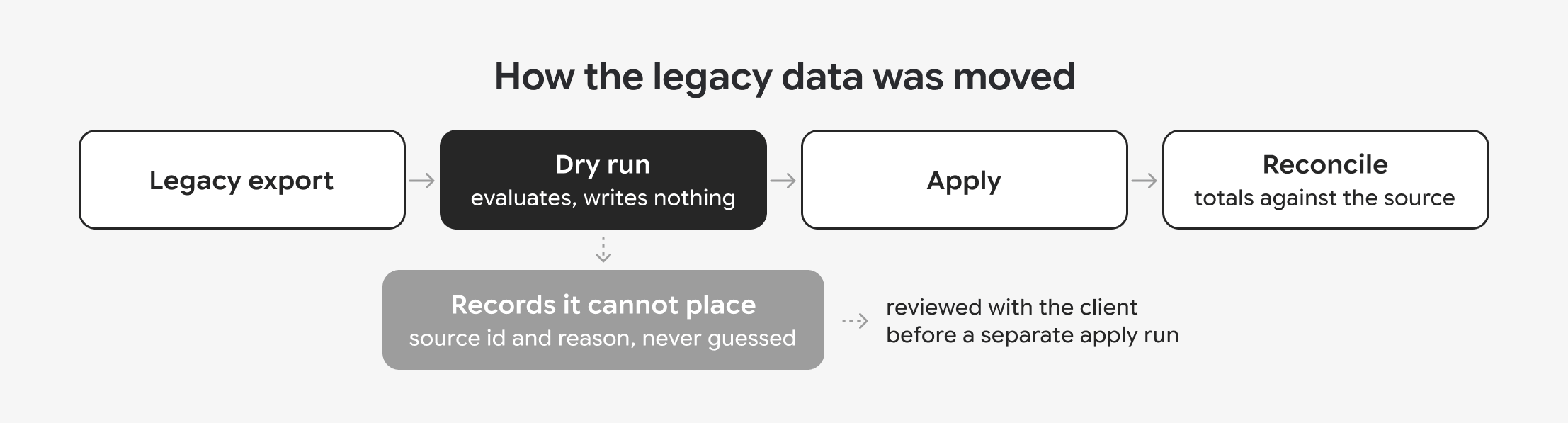
Anova had years of clinical records on the prototype platform that had to come across intact. So we built the migration to write nothing on its default run. Its first job was to surface the records that could not move safely: a case with no identifier, a value that did not match the field it belonged to. Each one came out with its original source ID and the reason it was rejected.
Those records went back to Anova as questions about their own data, and operators reviewed them before the apply run. This keeps the migration from silently guessing, correcting, or dropping clinical records it cannot place, which is the failure mode that loses patient history without anyone even noticing.
Before the apply run, we rehearsed the whole process as a dry run against the audited baseline. It reconciled with zero record loss. We'd also exercised it on synthetic data shaped like the real export, including records built to break it. Only then did a separate run write the production data, and the migration and cutover are now complete.
What Does Patient-Level Auditability Require?
A separate application audit trail that records who read or changed which patient record, and when. Cloud infrastructure logs alone cannot answer that question.
AWS CloudTrail records activity at the infrastructure level, but it cannot say who viewed a specific patient's record inside the app. So ClinicalDenialPro keeps its own application audit trail, recording who read or changed which record, by internal identifier.
The two logs answer different questions: CloudTrail covers the AWS infrastructure, the application log covers patient-data activity.
We built the trail around what the user did. Three decisions show what that means:
- Opening a library page is one browsing action in the trail. The page loads 50 cases, and those 50 reads share one request identifier, so the trail shows it as one browsing action.
- Viewing a chart records only the view. The analytics screen counts records in the database, so the row it writes names no patient and logs no patient read.
- The log records which model wrote each letter. The name comes from the service that answered the request, so it stays accurate even when the configured model changes.
There is no screen for this trail in the product. It is queried through the API, administrator only.
How Do You Keep a Vibe-Coded Healthcare App Maintainable After Launch?
Put the rules into automatic checks, so a team can run the app without the person who built it. Every change is checked before it ships, and a change that breaks a rule is blocked.
While the physician owned the prototype, only he knew how it worked. A production system needs a team behind it, so we built the foundation that lets one operate:
- database migrations and automated testing
- CI/CD and deployment controls
- monitoring, backups, and activity logging
Every change runs through an automatic gate before it goes live:
- The code is checked for errors before it ships. On the backend that means linting, formatting, strict type checking, and tests run against a real PostgreSQL database rather than a stand-in. On the frontend, linting, tests, and a full production build.
- The checks catch what one developer's laptop would miss. CI rebuilds the database from empty to confirm the setup steps still run, audits third-party dependencies for security holes, and scans the packaged application.
Two checks protect decisions from earlier in the rebuild:
- No one can ship a data route that skips the covered-entity wall. Every backend route has to declare which organization it serves. Leave that off and the build fails.
- No one can bring Base44 back. The low-code SDK is gone from the frontend, and a test fails the build if anything tries to import it again.
Moving Your Own App From Prototype to Production
A working prototype and a production healthcare system are different things, and closing the gap between them is the work described here.
If you built a healthcare app in Base44 or any other low-code tool and people have started to rely on it, that same gap is ahead of you.
MEV takes vibe-coded apps into production, running the work in a parallel track on AWS while you keep shipping. See how the vibe-code to production service works, or explore the 20-item HIPAA production checklist for the full list of what to verify before live users use the app.
We rebuilt Anova's ClinicalDenialPro, a denial-review app a physician built in Base44, into a production system on AWS. This article walks through that job: what we audited, what we changed, and the order we did it in. If you've built a healthcare tool on a low-code platform and people have started to depend on it, this is potentially the work ahead of you.
Every detail here is first-hand, from the MEV engineers who did the build. Each decision described is one we made on this specific application.